Site logo James's Devlog
  • Home
  • About Me
  • Skills
  • Experience
  • Education
  • More
    Open-source Featured Posts Recent Posts
  • Posts
  • Notes
  • Docs
  • Dark theme
    Light theme Dark theme System theme
Site logo Inverted logo
  • Posts
  • Project
    • Gamepub SDK
    • Go로 구축한 SDK API 서버
    • 광고 수익 보고서 자동화
    • 마케팅 데이터 수집 자동화
    • Grafana와 Loki로 장애 로그 모니터링 구축
    • 게임 서비스를 위한 푸시 서버 개발기
    • fastlane과 Jenkins로 SDK 배포 자동화
    • Jenkins와 Python으로 게임 운영 자동화
  • Unity
    • DocFX를 이용한 Unity 패키지 문서 작성과 배포 자동화
    • Unity Sprite Atlas 이해와 리소스 구성
    • Unity에서 FCM 사용하기: Android·iOS 연동과 트러블슈팅
    • Unity 딥링크 문제 해결: Jenkins 빌드에서 Universal Link가 실패한 원인
    • Android 16KB 페이지 크기 대응
  • Android
    • 라이브러리 생성
    • 앱 모듈을 라이브러리 모듈로 변환
    • Android SDK Jcenter 배포 기록
    • Android SDK Maven 배포 기록
    • acra 사용법
  • Go
    • Go Crawler Notification: 웹 콘텐츠 변경 감지 및 알림 도구 개발기
    • Unity Editor Google 인증을 위한 Go Cloud Functions 개발
  • iOS
    • 앱을 포함한 라이브러리 프로젝트 생성
    • Cocoapod 으로 소스 공개(Public)용으로 프레임워크 배포
    • Cocoapod 으로 소스 비공개(private)용으로 프레임워크 배포
    • iOS 키체인 접근 그룹 변경으로 UUID가 바뀐 문제
iOS 키체인 접근 그룹 변경으로 UUID가 바뀐 문제 featured image
iOS 키체인 접근 그룹 변경으로 UUID가 바뀐 문제

빌드 파이프라인 변경 후 기존 UUID를 읽지 못했던 원인과 키체인 접근 그룹 마이그레이션, 네이티브 코드 수정 과정을 정리했습니다.

  • iOS
  • Unity
  • 키체인
  • UUID
  • 빌드
2026년 8월 28일 금요일 Read
Cocoapod 으로 소스 공개(Public)용으로 프레임워크 배포 featured image
Cocoapod 으로 소스 공개(Public)용으로 프레임워크 배포

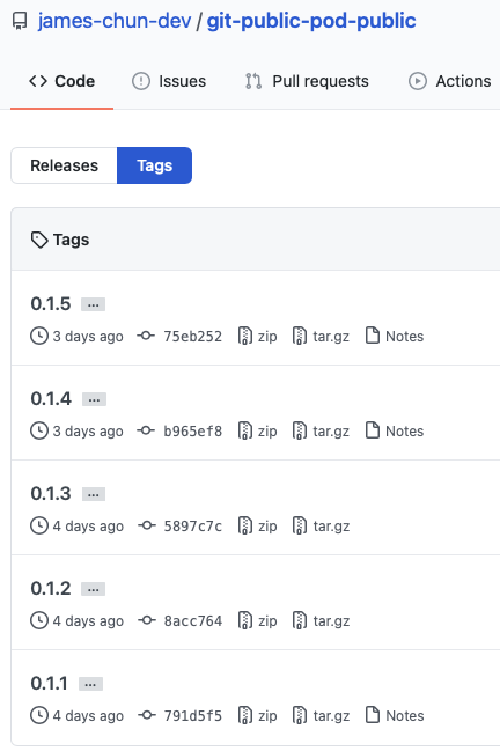
PodSpec 파일 생성 및 편집하기 spec 파일만 따로 만드는 방법이 있다. 사실 이 파일만 있다면 배포가 가능하다. $ pod spec create pod_name .podspec 이 로컬에 생성 될 것이다. Pod::Spec.new do |s| s.name = "git-public-pod-public" s.version = "0.1.5" s.summary = "The SDK for iOS Swift provides a modern way of implementing APIs." s.description = <<-DESC Developed in Swift, the SDK for iOS Swift provides a modern way of implementing LINE APIs. The features included in this SDK will help you develop an iOS app with engaging and personalized user experience. DESC s.homepage = "https://github.com/james-chun-dev/git-public-pod-public" s.license = "Apache License, Version 2.0" s.author = "James" s.platform = :ios, "13.0" s.module_name = "SDK1" s.source = { :git => "https://github.com/james-chun-dev/git-public-pod-public.git", :tag => "#{s.version}" } s.source_files = 'SDK1/SDK1/SDK1.h' end 더 많은 정보를 원한다면 cocoapods 공식사이트 문서 참고.

  • CocoaPods
  • iOS
  • 배포
2023년 1월 16일 월요일 Read
Cocoapod 으로 소스 비공개(private)용으로 프레임워크 배포 featured image
Cocoapod 으로 소스 비공개(private)용으로 프레임워크 배포

Git repo 만들기 git 주소가 2개가 필요하다. git lib repo (라이브러리 프로젝트) git specs repo (public 에서 사용한 cocoapod repo 역할을 할 git spec파일 저장소) 우선 라이브러리 git repo 가 있다는 전제하에 설명한다. 물론 podspec 파일도 셋팅되어있어야 한다. .podspec 파일을 편집해주고 파일 유효성 검사. 이건 공개용과 동일하다. $ pod spec lint --verbose specfilename.podspec 빈 레퍼지토리 https://github.com/james-chun-dev/specs.git 하나를 private 으로 만들었다. 그리고 pod repo 에 add 해준다. $ pod repo add git-private-pod-private https://github.com/james-chun-dev/specs.git

  • CocoaPods
  • iOS
  • 배포
2023년 1월 16일 월요일 Read
앱을 포함한 라이브러리 프로젝트 생성 featured image
앱을 포함한 라이브러리 프로젝트 생성

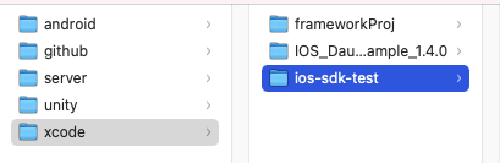
Workspace 를 생성하여 라이브러리와 앱 프로젝트를 생성하는 방식. 우선 빈폴더를 만들고 프로젝트 이름을 정합니다. File > New > Workspace…을 클릭합니다. Workspace 이름을 지정하고 Save. **File > New > Project…**을 클릭합니다. 먼저 앱 프로젝트를 생성하겠습니다.(순서는 상관없음) Product Name 을 정하고 Interface, Life Cycle, Language 각자 선호도에 맞게 선택합니다. Add to, Group 모두 타겟을 처음 만든 Workspace 를 선택해줍니다.(Framework 생성도 똑같음) Framework 도 동일하게 진행하게 되면 프로젝트 폴더구조는 다음과 같습니다.

  • iOS
  • Framework
  • Xcode
2023년 1월 16일 월요일 Read
Navigation
  • About Me
  • Skills
  • Experience
  • Education
  • Open-source
  • Featured Posts
  • Recent Posts
Contact me:
  • chc3484@gmail.com
  • coolishbee

Liability Notice: This theme is released under the MIT License. You may use, modify, and distribute it for non-commercial, commercial, and personal purposes without the author’s permission. The theme author provides no warranty and accepts no liability for issues caused by its use.


Toha theme logo Toha
© 2020 Copyright.
Powered by Hugo logo